

Stats
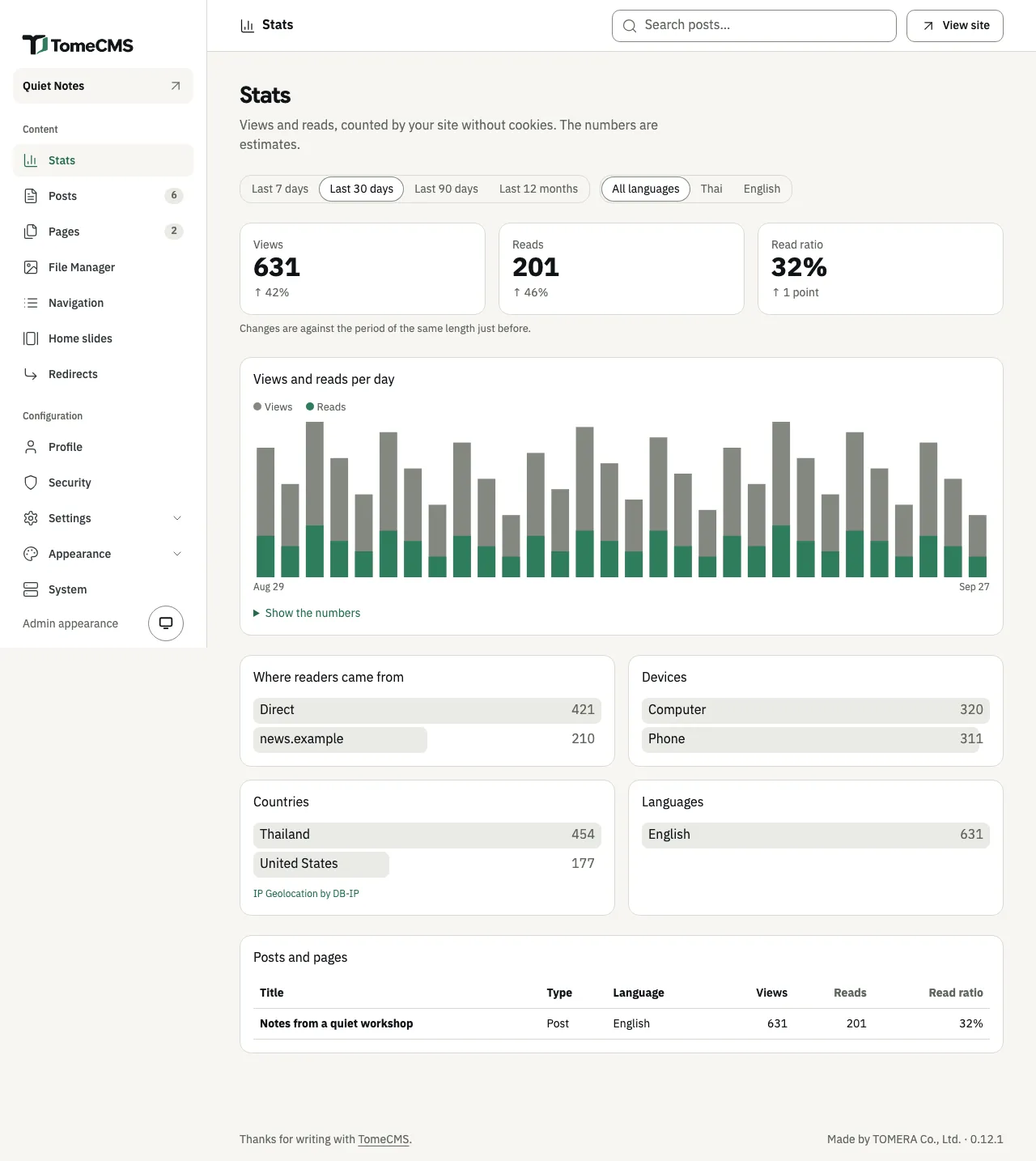
“Stats”, the first entry under “Content”, shows how often each post and page was opened and how often it was read to its end. It also shows where readers came from, and their devices, countries and languages. TomeCMS counts all of this itself, into daily totals, with no cookie and no outside service. The numbers are estimates, as the screen says under its heading.
Until the first reader is counted, the screen shows the report at zero under a notice headed “Nobody counted yet”. The notice explains that numbers appear once someone opens a published post or page, and that the browser you use for the admin is not counted. To see a number, open your site on your phone or in another browser. In the meantime the read ratio shows a dash, and each list and table below says “Nothing was viewed in this period.”
Choosing what to see
Section titled “Choosing what to see”The first row picks the period: “Last 7 days”, “Last 30 days”, “Last 90 days” or “Last 12 months”. It opens on 30 days, and each period ends today, in the site’s time zone. The second row narrows everything to “Thai” or “English”, or shows “All languages”. Every choice is kept in the page’s address, so a bookmark or a shared link opens the same view.
The totals
Section titled “The totals”Three numbers head the screen:
| Number | What it counts |
|---|---|
| “Views” | How often a page was opened. |
| “Reads” | How often a post or page was read to its end. |
| “Read ratio” | Reads as a share of views. |
Under each is its change against the period of the same length just before, such as “↑ 35%”. The read ratio changes in points, so 32% after 31% is “↑ 1 point”. With nothing counted in the period before, the line says “Nothing to compare with yet”.
The chart and the lists
Section titled “The chart and the lists”“Views and reads per day” draws a bar for each day of the period, with the reads in each bar. For “Last 12 months” it becomes “Views and reads per month”. “Show the numbers” opens the same figures as a table.
Four lists follow, each by views:
- “Where readers came from” names the site a reader followed a link from. “Direct” is a visit with no link behind it, and “This site” is one from another of your own pages. The list shows the ten sites that sent the most.
- “Devices” splits views into “Phone”, for a window under 768 pixels wide, and “Computer”.
- “Countries” shows the ten countries with the most views, and “Unknown” for views whose country could not be found.
- “Languages” splits views by the language of the page.
Posts and pages
Section titled “Posts and pages”The table at the bottom lists every post and page counted in the period, with its “Type”, “Language”, “Views”, “Reads” and “Read ratio”. The home page counts in the totals but has no row here. Press “Views”, “Reads” or “Read ratio” at the head of the table to sort by it, most first. The table shows 50 rows at a time, with “Next 50” and “Previous 50” to move between them.
Press a title to see that post or page on its own, with the same totals, chart and lists for it alone and the same periods to choose from. “Edit” opens it in the editor, and “View on site” opens it on the site, shown only while it is published there. “All stats” goes back. A post or page that has since been deleted keeps its numbers, and is listed as “Deleted”.
What is counted
Section titled “What is counted”A view counts when a reader arrives at a page. Reloading the page, or coming back to it with Back or Forward, is not another view. A read counts once the end of the post or page has come into view and the tab has been visible for 15 seconds in all.
Some visits are not counted at all:
- your own browser, once it has opened the admin
- readers who set Do Not Track or Global Privacy Control
- fetchers that call themselves bots
- theme previews
Someone determined can still add to the numbers, up to 120 hits in ten minutes from one address. Counting writes nothing to a reader’s browser, and the server keeps no record of any one reader. What a reader’s browser keeps lists what is sent and what the server keeps.
Where countries come from
Section titled “Where countries come from”When your CDN sends the reader’s country in a header, TomeCMS uses it: CF-IPCountry, or the header TOME_CMS_COUNTRY_HEADER names. Otherwise it looks the reader’s address up in the DB-IP Lite country database, and without that file the country is “Unknown”. The address is used for that lookup in memory and never stored.
The release images carry the database, so a managed install has it. A build from source builds its image on your server, and that image has none until you add the file, as Configuration explains under TOME_CMS_GEOIP_PATH. DB-IP Lite is licensed CC BY 4.0, and the “IP Geolocation by DB-IP” link under “Countries” is its credit.