
What TomeCMS is
TomeCMS is a content management system for a site in Thai and English, built with Astro. It draws the public site on the server and gives the owner a React admin to write in. Sites and apps built with something else can read the same published content over a REST API.
It is made for one person. A site has a single owner, who signs in with a passkey and runs the admin alone. That owner can publish in Thai, in English or in both, because a post or a page can have a Thai edition and an English one.
What it does
Section titled “What it does”Writing
Section titled “Writing”The editor covers what a post needs: headings, lists, quotes, code, tables, images, links and alignment. You decide whether each link opens in a new tab. A file from the File Manager goes into a post as a card the reader downloads, and a PDF opens in the browser instead.
Posts have drafts, previews, scheduled publishing and fields for search engines. The Thai and English editions of a post share its categories. Pages sit beside posts, and you set up the header and footer menus yourself.
The file library keeps images and documents together (PDF, Word, Excel, PowerPoint, CSV, plain text and ZIP), in folders you make, with search and a filter by type. The files live in S3-compatible object storage.
Publishing
Section titled “Publishing”Public pages are drawn on the server for every request. A reader’s browser always downloads a small counting script, plus the theme control’s script while it is on, plus the script of any plugin the owner has switched on.
A post’s address is in the language of its title, so a Thai title gives a Thai address. When an address changes, the old one redirects to the new one permanently. The site also has a sitemap and an RSS feed.
The REST API returns published content only, and describes itself in an OpenAPI 3.1 document. In headless mode TomeCMS hides its own blog and keeps the admin and the APIs, so another site can draw your content. Using the headless API has the details.
Two themes ship with TomeCMS, paper and a sparer one called plain. You choose between them under “Appearance” then “Themes”, in a preview that draws your own posts. Each language has its own home page slides, with an image, a few words and a button, which the theme shows as a still banner or as a slider.
The admin and the public site both have a light and a dark theme. Readers can pick their own unless you turn that off. The site has its own logo (SVG works), an optional second logo for the dark theme, and an icon.
Sign-in and plugins
Section titled “Sign-in and plugins”There is no password. The owner signs in with a passkey and keeps a set of one-time recovery codes for the day a device goes missing. A wizard of six steps sets the site up on the first run, and in it you choose the address of the admin.
The admin is in Thai or in English, following the site’s default language.
Plugins fill hooks that the core declares, and each one stays off until you switch it on. Five come with TomeCMS: Cloudflare Turnstile on the sign-in form, Sticky Banner, Popup, Image lightbox, and suggestions while writing from Jev (TypeSafe AI).
Running a site
Section titled “Running a site”Docker Compose runs PostgreSQL and a bundled SeaweedFS for the files, or you point the S3 settings at storage somewhere else. A backup keeps the database and the media together, and a check restores one into throwaway containers to compare it with the original. A deploy helper installs the whole site on one VPS.
How it fits together
Section titled “How it fits together”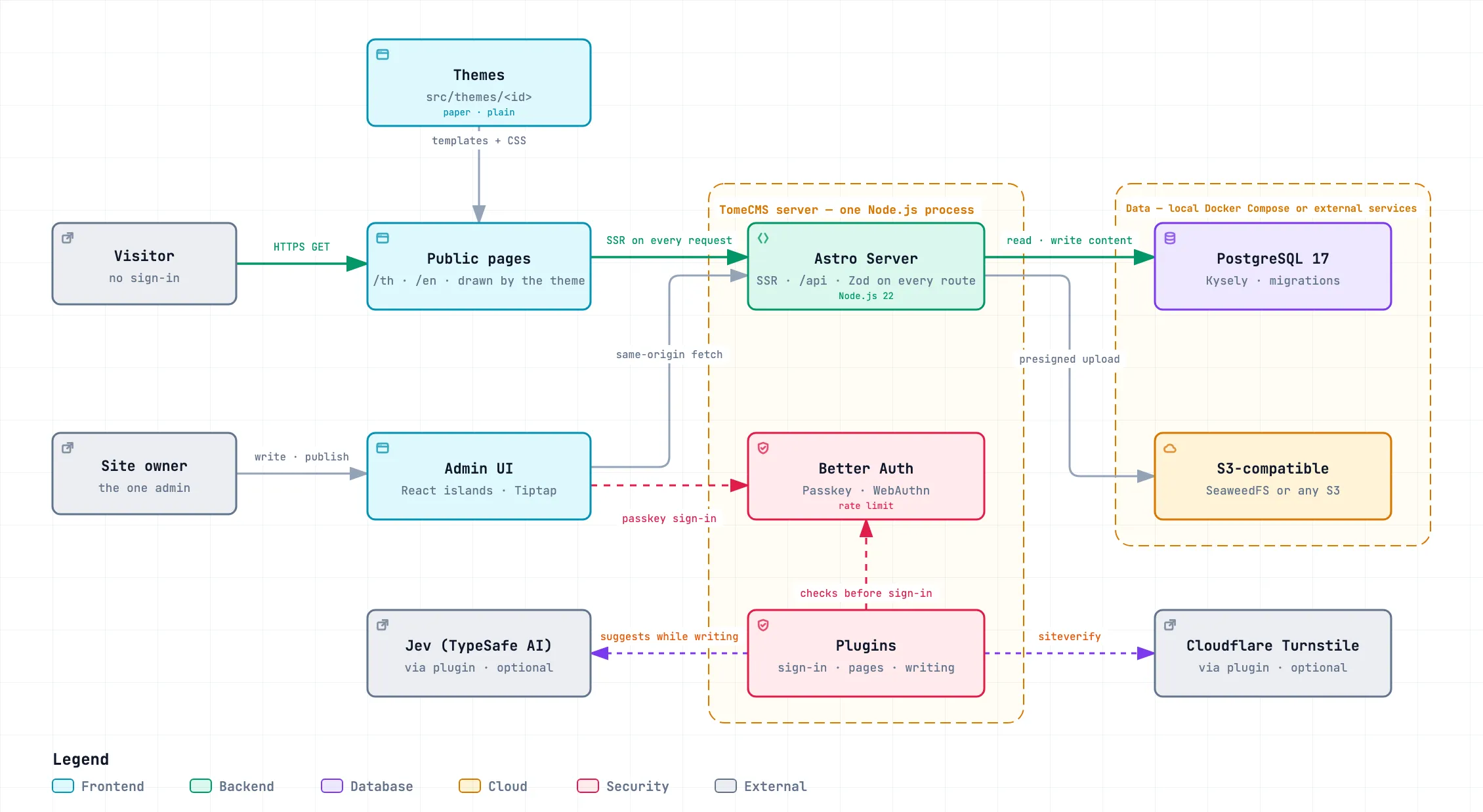
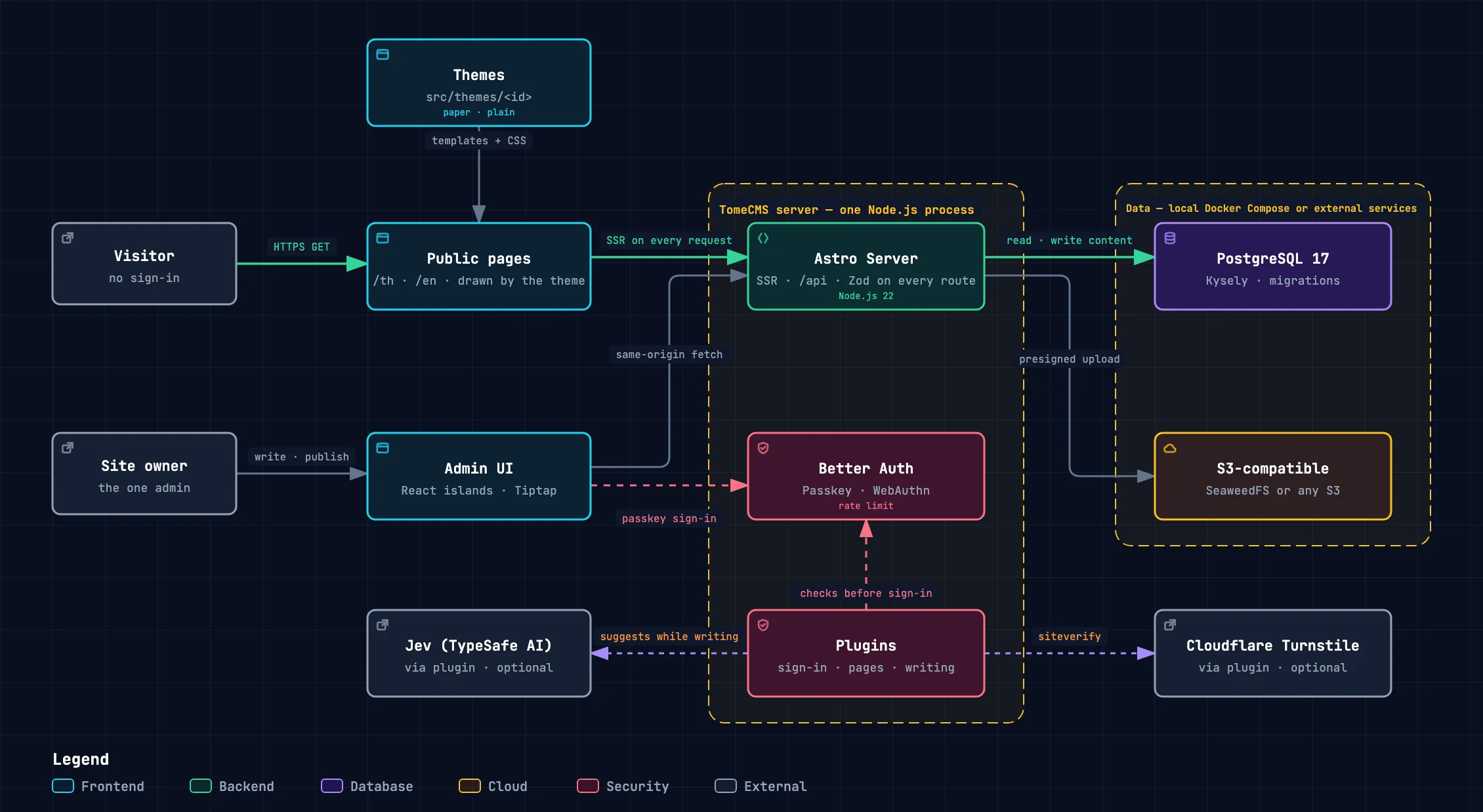
One Node.js process answers the public pages, the admin, the admin’s own API and the public content API. Passkey sign-in runs inside that process too. What lasts is kept outside it. PostgreSQL holds the content and the settings, and S3-compatible storage holds the files. On a single server that storage is the bundled SeaweedFS; it can also be a service elsewhere.
A plugin reaches out of the server only once you switch it on. Turnstile checks a sign-in with Cloudflare. Jev sends a post’s text to TypeSafe AI only when you press one of its buttons. It suggests categories, and picks a line for the excerpt and a passage for the search description from your own text.
The same diagram is in the repository as a page you can explore, with a guided view of each path through it: docs/tome-cms-overview.en.html. Download it and open it in a browser.
Where things stand
Section titled “Where things stand”TomeCMS is at version 1.4.0. A VPS gets a managed install: the installer runs an official image that it has verified against the release’s attestations, and the owner installs later updates from “System” in the admin. 1.0.0 was the first stable release, but its installer could not finish on a real server, so a managed install starts from 1.0.1, and the update path from 1.0.1 to 1.0.2.
The managed install is tested against real containers on every change, on amd64 in CI and on arm64, and CI builds the application image and runs the installer’s image checks against it. Its runs on real HTTPS servers, on both architectures, are recorded in the 1.0.0 release notes as they are done.
A 0.x install will not turn into a managed one in place. Moving to 1.x means a fresh server and a manual move of the content, as Installing on a VPS explains.