

Updating
A managed install, from 1.0.0 on, installs an update from the admin. A build from source, and every 0.x install, is upgraded on the server with the deploy helper that installed it.
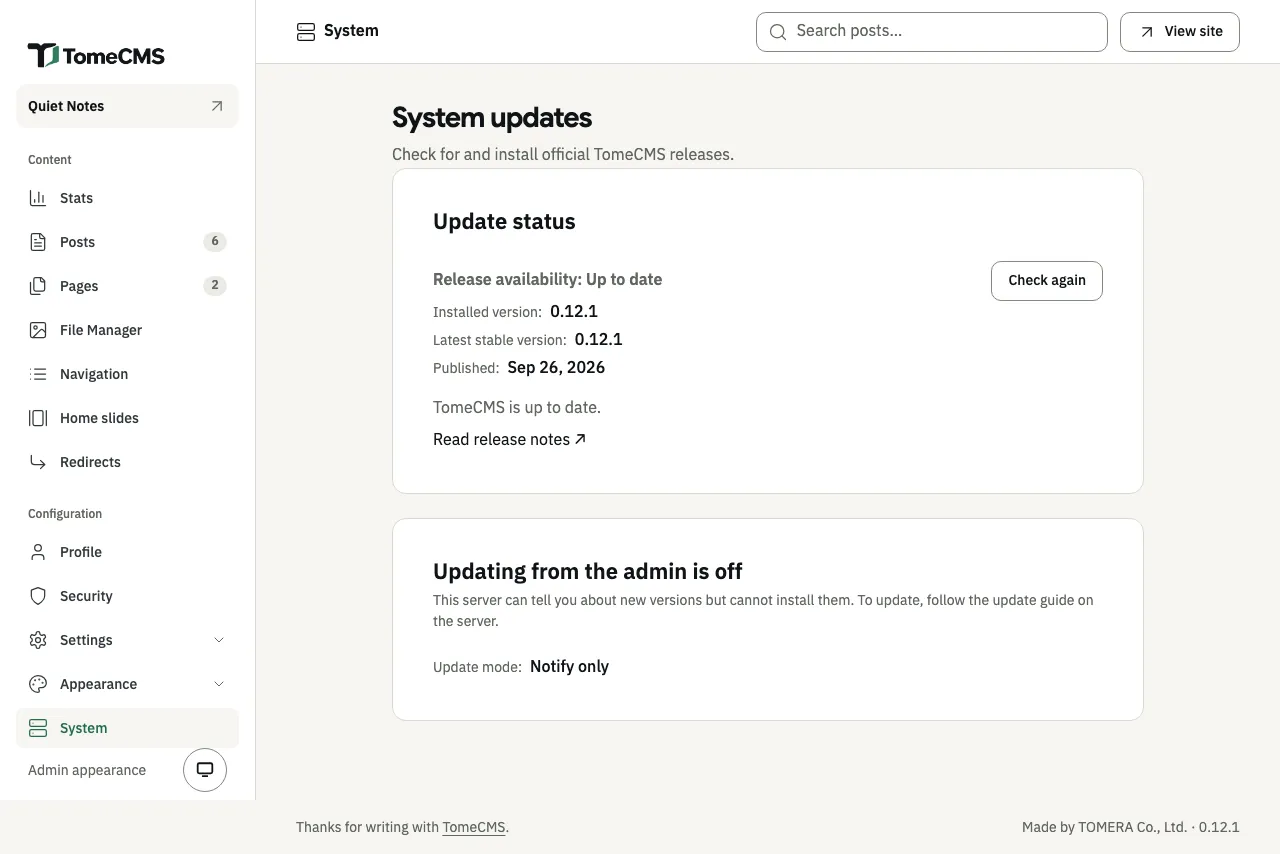
Under “System”, the admin shows your version next to “Installed version:” and checks the official repository on GitHub for a newer stable release. On a build from source that screen says “Updating from the admin is off”, and “Update mode:” reads “Notify only”: it tells you about a new version but cannot install it.
Updating a managed install
Section titled “Updating a managed install”On a managed install, “Update mode:” reads “From the admin”. When a newer release is out, “System” says “TomeCMS 1.3.4 is available.”, with that release’s version.
- Press “Read release notes” and read the notes of every version after yours.
- Press “Install 1.3.4”. The admin asks “Install TomeCMS 1.3.4?”. Press “Install 1.3.4” again, then confirm with your passkey.
- Keep the page open. “Installation progress” ticks off each step: “Check prerequisites”, “Verify the official update”, “Download update”, “Prepare maintenance”, “Create recovery backup”, “Apply database migrations”, “Restart TomeCMS” and “Check application health”. The site is briefly down while TomeCMS restarts.
- When it is done, “System” says “TomeCMS 1.3.4 is installed.”
Afterwards the “Last update” card says when it finished and, with an updater of 1.3.0 or later, how long the site was offline and what the backup held.
What the updater does, and does not do:
- It installs only an official release that it has verified against the release’s attestations, the same checks the installer makes.
- Before each update it takes a backup into
/var/backups/tome-cms/, then runs the migrations. When the update brings a migration, the backup is full: PostgreSQL and the bucket. When it brings none, which is most updates, an updater of 1.3.0 or later backs up PostgreSQL alone: both versions ship the same migrations, so no table changes, and copying the media library is what keeps the site offline longest. The files are left out on the understanding that an update without a migration does not rewrite them; keep your own copies of the bucket, as Backups and restore describes. The application you are updating from has to be 1.3.0 or later too, since the backup runs in it. It never deletes old backups, so leave room for them on the disk and copy them off the server yourself. - If an update fails after its migrations have started, it goes back to the previous application only when the new release declares the previous version compatible with the new database. The admin then says “Your previous application is running.” Otherwise the update stops and waits for the server’s operator, as Recovery describes. Restoring the database and the files from the backup is always done by hand.
- There are no automatic updates and no beta channel. The PostgreSQL and SeaweedFS images are upgraded by hand, and so is the updater service, as the next section shows.
Upgrading the updater
Section titled “Upgrading the updater”The updater runs on the server itself and is built once, when the server is installed. Updating from “System” replaces the application only, so a server keeps the updater it was installed with. "updaterVersion" in the updater’s status says which one it has:
sudo curl -s --unix-socket /run/tome-cms/updater.sock http://localhost/v1/statusA release that needs a newer updater says so on “System” (“This version needs its updater upgraded by hand first”). Otherwise it is worth doing when a release’s notes say its updater changed. From 1.3.0, it replaces the updater with the one in a checkout of a release, and leaves the site running:
cd /opt/tome-cms-srcgit fetch --depth 1 origin tag v1.4.0git checkout --detach v1.4.0npm cisudo npm run updater:upgrade -- --dry-runsudo npm run updater:upgradeA server installed before 1.0.2 has no /opt/tome-cms-src. Clone the release there instead of the first three lines:
git clone --depth 1 --branch v1.4.0 https://github.com/Dhanabhon/tome-cms.git /opt/tome-cms-srccd /opt/tome-cms-src--dry-run checks and says what it would replace, without changing anything. The upgrade builds the updater from the checkout, stops the tomecms-updater service, replaces /opt/tome-cms/updater, the service’s unit file and /opt/tome-cms/compose.managed.yaml with the release’s own, starts the service again and waits for it to answer with its new version. The site stays up throughout, and a change to the compose file takes effect the next time the application starts. The previous updater, unit file and compose file are kept beside the new ones with .previous- and the time in their names. If the new updater does not answer within 30 seconds, it puts the previous one back. A change you made to the compose file by hand is not kept: the command says when the file was not the release’s own, and your copy is the .previous- one. An old updater cannot read the job records a newer one writes, so once an update has run under the new updater, do not put the .previous- updater back by hand.
It refuses to run while an update is in progress, from a checkout that is not a clean copy of the release tag, or to go back to an older updater. The same version again is allowed, and repairs an updater whose files were damaged.
A 0.x install cannot become a managed one in place. The move to 1.0.0 needs a fresh server, as Installing on a VPS explains.
Upgrading a build from source
Section titled “Upgrading a build from source”-
Stop the application, then back up PostgreSQL and the media bucket together and check the backup, as Backups and restore describes. Leave the application stopped, so nothing is written that the backup does not hold.
-
Read the release notes of every version after yours. They are in
docs/releases/in the repository, one file per version, and each says what its upgrade needs. -
In the checkout, get the newer code and run the helper:
Terminal window git pull./scripts/deploy-vps.sh -
Check that the application is ready, as after the first install:
Terminal window curl -s http://127.0.0.1:4321/health/ready
The helper keeps .env.local as it is. It builds the new application image, runs the waiting migrations in a one-shot container, and then starts the new application container. The site is down from the moment you stop the application until the new container is ready.
An install from 0.2.0 lacks settings the newer helper writes, so it stops with Existing .env.local needs updates; rerun with --force to merge values while preserving secrets. Run ./scripts/deploy-vps.sh --force then: it adds the missing settings and keeps your secrets.
Database migrations
Section titled “Database migrations”A new version can change the database’s tables. Each change is a migration, and this command applies every one the database does not have yet:
npm run db:migrateThe updater and the deploy helper both run it for you, inside a one-shot application container, so you do not need to. If you run it by hand in the checkout, run npm ci there once first. It reads the connection from .env.local.
It prints one <name>: Success line for each migration it applies, or Up to date when none was waiting. The waiting migrations run together in one PostgreSQL transaction. If one fails, the command prints Migration failed, none of them is applied, and the database stays as it was.
TomeCMS has no command that undoes a migration. To go back to an older version, restore the backup you made before the upgrade.
How many are waiting
Section titled “How many are waiting”Find the version your install was created from, or last upgraded to, and count from there:
| Your install is from | Waiting | Which |
|---|---|---|
| 1.4.0, 1.3.3, 1.3.2, 1.3.1, 1.3.0, 1.2.1, 1.2.0, 1.1.2, 1.1.1, 1.1.0, 1.0.4, 1.0.3, 1.0.2, 1.0.1, 1.0.0, 0.14.1, 0.14.0, 0.13.0 or 0.12.1 | 0 | None |
| 0.12.0 or 0.11.0 | 1 | 026_planned_dates |
| 0.10.0 | 3 | The one above, 024_site_maintenance and 025_content_stats |
| 0.9.0 or 0.8.0 | 4 | The three above and 023_home_slides |
| 0.7.0 or 0.6.0 | 6 | The four above, 021_media_documents and 022_navigation_new_tab |
| 0.5.0 or 0.4.0 | 7 | The six above and 020_site_brand |
| 0.3.0 | 10 | The seven above, 017_scheduled_publishing, 018_thai_slugs and 019_content_redirects |
| 0.2.0 | 19 | The ten above, and 008_update_rate_limit_actions through 016_theme_settings |
The counts follow each version’s release notes. An install made from a checkout between two releases, or from before 0.2.0, can have a different number waiting. The admin’s notice names them exactly.
The admin’s notice
Section titled “The admin’s notice”When the code expects a migration the database does not have, every admin screen opens with the notice “The database needs updating”. It first warns that saving will fail until someone runs npm run db:migrate on the server, then lists the migrations after “Waiting:”. The admin asks the database on each screen, so once the migrations have run, the notice is gone from the next screen you open.
Until then /health/ready reports "migrations":"pending" and "status":"not-ready".